The Code-Based Website: The SEO Superpower Delivering Better Results for Our Clients

Reading time: 13 minutes
Key Takeaways
- Code-based websites are outperforming older technology. In our first six-week case study, average time on site rose 48%, organic search visits grew 76% and the total time visitors spent reading the site almost tripled.
- Rankings followed. The same site went from 11 to 40 keywords in Google's top three, its average position improved from 6.8 to 5.0, and its mobile Lighthouse score went from 62 to 100 with no tuning at all.
- Speed and clean HTML are the default state of a code-based site rather than an upkeep job, and that is where the longer visits come from: the page is there, complete, before a visitor finishes reading the headline.
- Every change is approved on a real preview link and goes live in under a minute, so clients sign off on the actual page before Google sees it and nothing ships unreviewed.
- The host is interchangeable and the workflow is the point. We moved from Vercel to Cloudflare because it does the same job for a fraction of the cost.
- A traditional CMS still fits teams of non-technical editors who publish every day, so the deciding question is who edits the site and how often.
A code-based website is built from a repository of plain code and content files rather than a CMS database, and published through a workflow in which every change is reviewed, previewed on a real link and reversible. Over the past two years at Paul Teitelman SEO Consulting, it has become the way we build client sites, and the results have been strong enough that it is now our default recommendation.
Why This Is So Exciting
For the first time in our careers, there are no rules set by a platform. A code-based site has no theme deciding where a headline can go, no page builder deciding how fast a page loads and no plugin catalogue to work around. We can do what the client and the data call for.
That has moved our attention from maintaining a system to the work that grows a business: conversion rate optimization, pages designed around how each client's customers actually buy, and products custom-tailored to each client's preferences rather than to what a template allows. When a client asks for a different booking flow, a comparison table or a page that answers one question perfectly, the answer is now yes, and it ships the same week.
The Benefits We've Seen So Far
- Page speed on mobile and desktop. Performance scores in the high 90s are the default state of these sites, with pages weighing a fraction of what they did before.
- Lower costs. Hosting on Cloudflare runs at a fraction of managed hosting, there are no plugin licences to renew, and far fewer hours go to updates and patches.
- More deliverables every month. The hours that used to go into maintenance now go into new pages, tests and content, so clients see more shipped work for the same retainer.
- Higher rankings and better conversion rates. This is the part that matters most. The clinic in the case study below grew its top-three rankings from 11 to 40 in six weeks. On our own site, rankings moved within a week of launch before we had changed a single word on a page, because only the back end changed.
Cloudflare Pages builds and deploys a website directly from a GitHub repository, automatically rebuilding it whenever the code changes. That may sound like a developer workflow, but the SEO implications are much bigger. From site speed and technical control to scalability and AI search visibility, the combination has changed how we think about building websites for search.
Here’s why the code-based website, built on Cloudflare Pages and GitHub, has become such a powerful SEO combination:
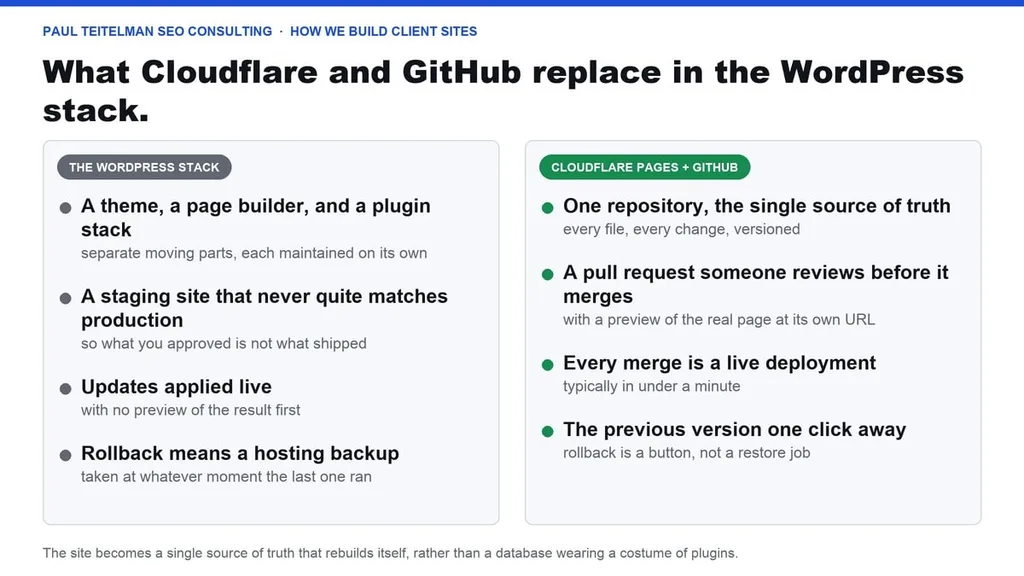
What Cloudflare and GitHub Replace in the WordPress Stack
GitHub stores a website’s complete source in a repository, which is a versioned history of every file where any proposed change appears as a pull request that someone reviews before it merges.
Cloudflare Pages watches that repository and turns every merge into a live deployment, typically in under a minute, with the previous version kept one click away.
Together they replace the familiar WordPress pile: the theme, the page builder, the plugin stack, the staging environment that never quite matches production, and the quiet dread of clicking Update on a Tuesday afternoon. The site becomes a single source of truth that rebuilds itself, rather than a database wearing a costume of plugins.
Why Does Version Control Matter for SEO?
SEO problems often start with the same question: what changed?
Rankings suddenly drop. Schema disappears from a template. A category page that was performing well starts serving thin content. Something has changed, but figuring out what, when, and why can be surprisingly difficult on a conventional WordPress site.
With version control, there’s a clear record. Instead of retracing steps or trying to remember which update may have caused the problem, we can look at the repository and see exactly what changed, where it changed, when it happened, and who approved it.
For SEO troubleshooting, that visibility can turn a lengthy investigation into a much more straightforward fix.
“It’s totally transformed the way we manage client work. We act more quickly and more efficiently, and that shows up where it counts, in the deliverables and the rankings.”
Rob Teitelman, VP at Paul Teitelman SEO Consulting
The audit trail runs in both directions. When we ship a change we believe will move rankings, the commit date gives us a clean before-and-after line to measure against, which pairs beautifully with the annotation work we already do in analytics. And when a change goes wrong, the rollback is the previous deployment, one click away, not a frantic restore from a hosting backup taken at an unknown moment.
Preview Deployments: Approve the Real Page Before Google Sees It
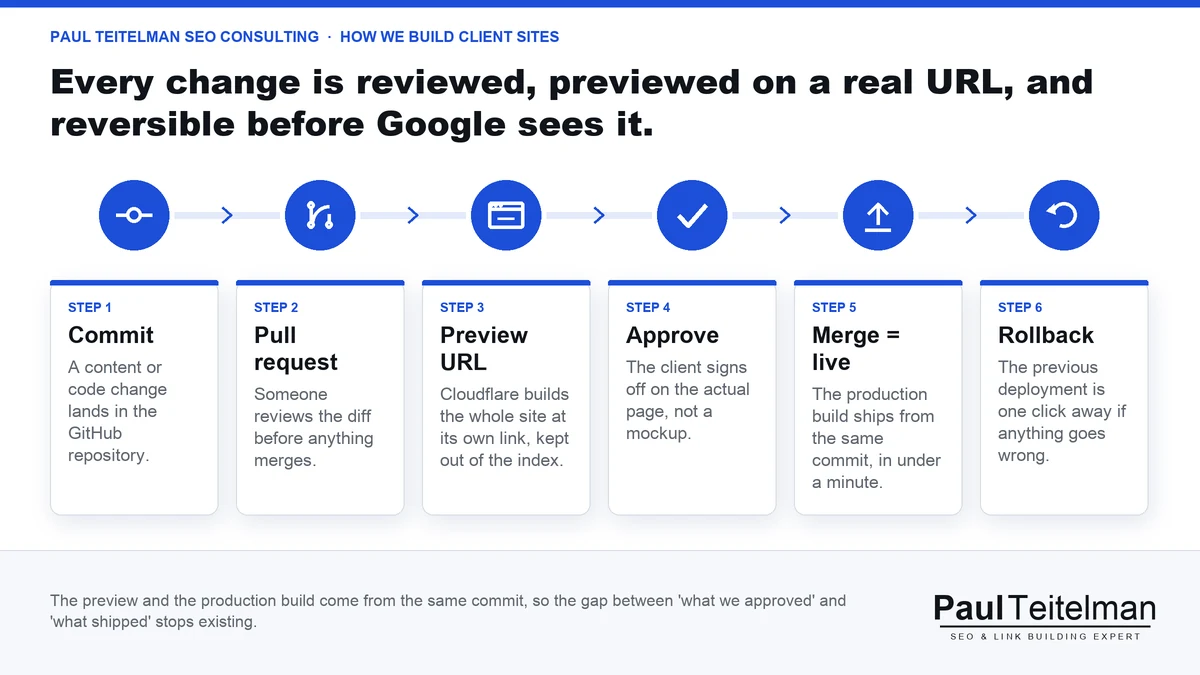
This is the feature that converted us. Every pull request generates a preview deployment, a complete working copy of the site at its own URL, showing exactly what the site will look like if the change merges. We launched Toronto Hearing Consultants' new site this way, 78 pages and a 43-post blog, with every page reviewed and approved by the clinic at a real, clickable preview link before any of it went live (the results are in the case study below). The launch-day audit found the navigation and internal links already clean, because they had been tested as a working site for weeks.
Keep those preview URLs out of the index and the old gap between “what we approved on staging” and “what actually shipped” simply stops existing, because the preview and the production build come from the same commit. Cloudflare lets you restrict preview access, and adding a noindex header to preview builds takes one rule, which is worth confirming during setup rather than discovering in Search Console later.
Case Study: Toronto Hearing Consultants, Six Weeks After the Switch
Toronto Hearing Consultants is an independent audiology clinic with two Toronto locations, in Bloor West Village and the Annex. Its WordPress site had served the clinic well for years, and in 2026 the team asked us to rebuild it so the site could keep up with the way patients now search, on Google and in AI answers. The new site went live on September 28, 2026, on exactly the stack described above.

The rebuild covered 78 pages and 43 blog posts, and every one of them was approved by the clinic at a preview link before launch. Every old URL was kept or redirected, so the launch-day audit had nothing to fix. The whole site is plain HTML served from Cloudflare's edge, which is why the speed result needed no tuning: the old homepage scored 62 on Google's mobile Lighthouse test, and the new one scores 100, with its largest element painting in 1.0 seconds.
The number we care about most is how long people stay. Here is the comparison for visitors arriving from organic search, six weeks before the launch against the six weeks after it, measured the same way in Google Analytics on both sites.
| Organic search visitors | Six weeks before | Six weeks after |
| Sessions | 660 | 1,160 |
| Average time on site | 2 minutes 36 seconds | 3 minutes 51 seconds |
| Total time spent on the site | 8.1 hours | 21.9 hours |
| Engagement rate | 60% | 64% |
| Bounce rate | 40% | 36% |
Average time on site rose by 48%, and because there were 76% more visits as well, the total time patients spent reading the site almost tripled. The trend has kept climbing month by month: 2 minutes 19 seconds in September, 2 minutes 52 seconds in October and 3 minutes 37 seconds so far in November. Visitors who typed the address in directly behaved the same way, doubling their time on site from 1 minute 9 seconds to 2 minutes 26 seconds.
Rankings followed. Here is what Ahrefs recorded for the site's Google rankings in Canada six weeks before the launch and six weeks after it.
| Google rankings (Ahrefs) | Six weeks before launch | Six weeks after launch |
| Ranking keywords | 72 | 99 |
| Keywords in the top three | 11 | 40 |
| Keywords on page one | 69 | 93 |
| Average position, all keywords | 6.8 | 5.0 |
| Average position, the 46 keywords ranking on both dates | 6.3 | 5.2 |
| Estimated monthly organic traffic | 358 visits | 465 visits |
The average position improved even though 53 new keywords joined the list, which would normally pull an average down. On the 46 keywords that ranked on both dates, 23 moved up, 11 held and 12 slipped, and nine of them climbed to number one.
Two honest footnotes belong with those numbers. The new site tracks more actions than the old one did, such as booking clicks, phone taps and directions requests, so we compare only the measures that existed on both sites. And the clinic's content program continued through the launch, so the rebuild is not the only thing that changed. What the rebuild changed on its own is the part a visitor feels in the first second: the page is there, complete, before they have finished reading the headline.
A Second Data Point: Our Own Site, One Week In
On November 9, 2026, Paulteitelman.com moved from WordPress to the same code-based stack, with every page, every word and every tracking tag carried over unchanged. That makes it a clean test of the platform alone, and the first thing it changed was speed. We ran Lighthouse on the old site and the new build side by side before launch, on the homepage, a service page and a blog post.
| Lighthouse, before launch | Old site | Code-based site |
| Mobile performance score, homepage | 78 | 98 |
| Desktop performance score, homepage | 91 | 99 |
| Largest element painted, mobile homepage | 4.7 seconds | 2.1 seconds |
| Page weight, three pages tested | 894 KB to 1,052 KB | 85 KB to 223 KB |
| Best practices score, every page tested | 74 | 100 |
Google noticed quickly. In Search Console, the site's average position across every query moved from 36 in the two weeks before the switch to 26 in the first five days after it. Part of that is housekeeping, since hundreds of thin archive pages that ranked deep on the old site now redirect to real pages, but a ten-place move in a week is a signal we rarely see without new content.
Visitors were leaving the old site fast, especially on mobile, where the average organic visit lasted 15 seconds. The early readings on the new site show far more of them staying, and we will publish those engagement numbers at the six-week mark, once the sample is large enough to be fair.
The Speed Dividend
Cloudflare serves pages from one of the largest edge networks in the world, and sites built this way are typically static or server-rendered with none of the plugin overhead that accumulates on a mature WordPress install. The result is that strong Core Web Vitals become the default state of the site rather than an optimization project you revisit every quarter.
To be fair to WordPress, it can definitely be fast. The difference is upkeep: a fast WordPress site is an achievement someone maintains against plugin updates and theme bloat, while a fast site on this stack is what you get by doing nothing special. Over a multi-year engagement, the stack that is fast by default wins on both performance and the hours not spent defending it.
That time dividend is the part clients actually feel:
“For anyone whose job is to make a client’s budget go further, this technology is genuinely exciting. We can do more with less. A site built this way lets us make as many changes as the strategy calls for, as often as it calls for them, without the restrictions and the waiting that used to slow everything down. Every hour we save on managing the website is an hour that goes into the work that actually moves rankings. And the part that excites me most is where it leads. Because the whole site lives in code, we can plug in the latest AI tools as they arrive, automate the routine work, and bring our clients the best technology and the newest possibilities the moment they exist, not a year later.”
Rob Teitelman, Paul Teitelman SEO Consulting
Why Cloudflare Rather Than Vercel
We started this way of working on Vercel, which pioneered the developer experience the whole category copied, and it is still an excellent platform. We moved most client work to Cloudflare for two practical reasons.
The first is that the SEO-relevant capabilities are equivalent. Both build from a GitHub repository, both generate preview deployments per pull request, both serve from a global edge network, and both render on the server when the framework asks them to. Nothing in the argument above depends on which one you choose.
The second reason is cost at agency scale, which is what actually moved us. Cloudflare’s developer platform pricing includes a genuinely generous free tier and low paid tiers, and across a roster of client sites that difference compounds into real money, without any of it showing up as a compromise the client can feel. If your team already knows Vercel, stay there. If you are choosing today, run the numbers.
What This Means for AI Search
AI search raises the stakes on rendering. Answer engines and crawlers reward clean, server-rendered HTML where the content, headings, schema, and internal links are present in the source rather than assembled by JavaScript in the browser.
Google documents the risks of JavaScript-dependent rendering in its own JavaScript SEO guidance, and we have lived the failure case: we watched one client’s replatform onto a JavaScript-heavy framework serve Google effectively blank pages, and organic visibility slid for weeks before the rendering gap was diagnosed and fixed.
This stack renders pages on the server when you ask it to, and schema lives in the codebase where it versions with the page it describes, feeding the same entity signals we build through content structured for AI search. Redirects live in one reviewed configuration file instead of a plugin’s database table. For a discipline that increasingly depends on machines parsing your pages correctly, owning the exact HTML you serve has become an SEO deliverable in its own right.
There is one Cloudflare-specific caution worth naming. The same bot-management features that make Cloudflare excellent at blocking bad traffic can also block AI crawlers you actually want, so check those settings deliberately rather than inheriting the defaults. That check is now step one of every AI search audit we run.
Where WordPress Still Earns Its Keep
An honest comparison is that if a non-technical team publishes content every week, WordPress remains the better tool for them. Its editor is familiar, its ecosystem solves business problems (bookings, forms, online stores, event calendars) in an afternoon, and no one needs to learn what a pull request is. The GitHub workflow asks editors to work differently, and for some teams that cost outweighs every benefit above.
Our own rule of thumb after running both stacks across many clients is this: the more a site’s value depends on templates and technical precision, the stronger the case for Cloudflare and GitHub, and the more it depends on daily hands-on publishing by non-developers, the stronger the case for staying put. Many of our engagements land on a hybrid, where the marketing site moves and the high-volume publishing stays.
How to Switch Without Burning Your Rankings
A migration only counts as a win if the rankings survive it, and the failure mode is well documented in our own case files: one client’s multi-month traffic decline traced back to replatformed URLs that were never redirected. The playbook that prevents it:
- Crawl the current site first and inventory every URL that has traffic or backlinks, because the pages you forget are the pages that bleed.
- Build the complete redirect map before launch day, review it as code in the repository, and test it on a preview deployment.
- Keep titles, meta descriptions, headings, schema, and internal links at parity on launch, since a replatform is the wrong moment to also rewrite everything.
- Watch Search Console daily for the first weeks and treat any crawl anomaly as urgent, because rendering and redirect problems show up there before they show up in revenue.
This is exactly the kind of transition we shepherd for clients as part of technical SEO consulting. Step zero is always an audit of what the current site has earned, so nothing gets left behind.

Frequently Asked Questions
Is Cloudflare Good for SEO?
Yes, and mostly for structural reasons: fast edge delivery everywhere, server-rendered HTML when your framework provides it, preview deployments that keep unfinished work out of the index, and a deployment model where every change is reviewed and reversible. The one thing to watch is bot management, since aggressive settings can block crawlers you want. That includes the AI crawlers you may want: new Cloudflare domains block known AI bots by default, so confirm that setting reflects a decision rather than a default before assuming answer engines can read the site.
Cloudflare Pages vs Vercel: Which Is Better for SEO?
For SEO purposes, they are effectively equivalent: both build from GitHub, both generate per-branch previews, and both serve from a global edge network. The practical differences are pricing and developer preference rather than anything a search engine or answer engine can detect. We started on Vercel and moved most client work to Cloudflare for cost at agency scale, with no change in rankings, speed, or crawlability. If your team already knows one of them, that familiarity is worth more than any feature gap.
Is WordPress Bad for SEO?
No, and plenty of top-ranking sites run it. The honest framing is that WordPress makes good SEO possible while requiring ongoing discipline, whereas the Cloudflare and GitHub stack makes several good practices automatic. On WordPress, speed, clean HTML, and a safe staging process are things someone maintains against plugin updates and theme bloat. On the code-based stack they are the default state of the site, and the difference shows up over a multi-year engagement in the hours spent defending performance rather than improving it.
Can I Move From WordPress to Cloudflare Without Losing Rankings?
Yes, when the migration is treated as an SEO project rather than a development project. The essentials are a complete pre-launch redirect map, content and metadata parity, and close Search Console monitoring after launch. The failure mode we see most often is replatformed URLs that were never redirected, which can produce a traffic decline that runs for months before anyone connects it to the launch. Crawl the old site first, map every URL with traffic or backlinks, and test the redirects on a preview deployment before the switch.
Do I Need Developers to Run a Site on Cloudflare and GitHub?
For setup and template work, yes, and that is the real cost of the stack. Day-to-day content publishing can be made editor-friendly with a headless CMS, but a team with zero developer support will feel the friction quickly. A practical middle path is the hybrid many of our engagements land on: the marketing site and its templates move to Cloudflare and GitHub, while high-volume publishing stays on WordPress, where non-technical editors are already comfortable.

About the Author
Paul Teitelman - SEO Expert & AI SEO Consultant
Paul Teitelman is Toronto’s trusted SEO Expert & AI SEO Consultant — 18+ years in the trenches, 1,000+ campaigns delivered, and a reputation built entirely on results. His relentless focus on search visibility and strategic link building has made him an industry leader with a client base that keeps growing.