JavaScript SEO for Business Owners: Google Can Read Your New React Site. Can ChatGPT?
Reading time: 11 minutes
Key Takeaways
- What visitors see on your website isn't always what a crawler can read. Check whether your text and links are included in the HTML sent by your website or only appear after JavaScript runs.
- Google can run JavaScript to build the page and read its content. This process is called rendering, and pages may wait in a queue before Google completes it. That can delay when Google sees content loaded through JavaScript.
- Some AI crawlers may miss content that needs JavaScript to load. A 2024 study by Vercel and MERJ found that the OpenAI, Claude, and Perplexity crawlers tested did not run JavaScript.
- Include this requirement in your website brief: the main content should be readable without running JavaScript. Your developer can do this by generating pages on the server or when the site is built.
- After launch, check that your main text and links appear in the page source. Then use Search Console's URL Inspection tool to see how Google renders the page and look for missing content.
Your developer has proposed rebuilding your website in React. The demo looks good and runs smoothly. Before you approve the project, ask how search engines and AI crawlers will read the content on the finished site.
A key part of JavaScript SEO is checking how your website delivers that content. Some sites include the text and links in the HTML a crawler receives. Others rely on JavaScript to load them in the browser. Google can run that code, but some AI crawlers may miss content that loads this way.
We help clients review these decisions as part of technical SEO consulting. You don't need to understand React to have this conversation with your developer. You need to know what to ask before the build begins and how to check that your content is accessible once the site is live.
What a Single Page Application Is and Why It Can Look Empty
A traditional website sends a finished page, so the browser receives an HTML file with the headings, paragraphs, links and images already in it, and shows them.
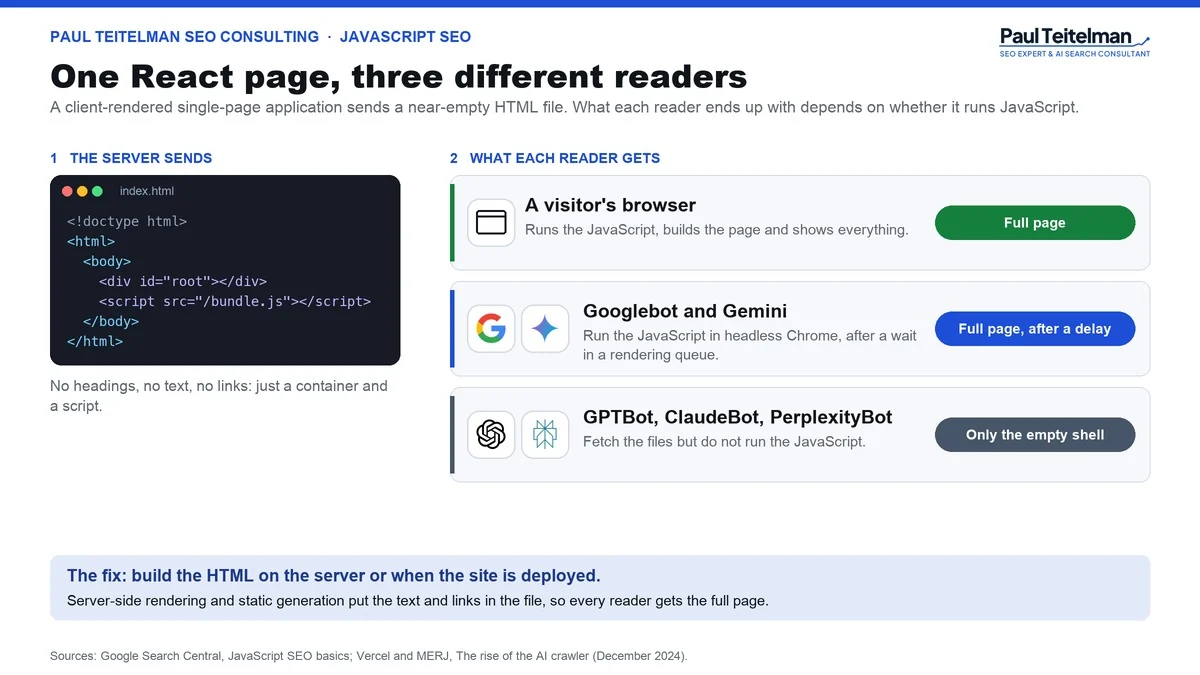
A single-page application, often shortened to SPA, sends a shell. The HTML file is nearly empty, with a small container and a link to a JavaScript bundle. The browser downloads the bundle, runs it, and the bundle builds the page on the spot, fetching the content from an API as it goes. To a person with a modern browser, the result is quick and smooth, which is why developers like the approach and why many React, Vue, and Angular projects start this way.
The difference only shows when something other than a browser asks for the page, and that moment is what single-page application SEO is about. A crawler that does not run JavaScript receives the shell and nothing else: no headings, no text, no internal links to follow. The framework is doing what it was built to do, and the file holds nothing readable until the code runs.
How Google Handles JavaScript
Google can run JavaScript, and its own JavaScript SEO guidance describes the process in three stages: crawling, rendering, and indexing. Googlebot fetches the HTML first, and if the page depends on JavaScript, the page goes into a rendering queue, where a headless version of Chrome runs the code and produces the finished page, which is then indexed.
Three practical consequences follow from the way that process works.
- The content usually gets indexed, which is why many client-rendered sites rank fine.
- There is a delay between the first crawl and the render, and on a large site that delay can stretch, so new or changed pages can sit half-understood for a while.
- Anything that fails during rendering, such as a blocked script, a slow API or an error in the code, leaves Google with the empty shell, and the page is indexed as if it had no content.
So Google is forgiving within limits, and the AI crawlers set a stricter bar, which is the part most rebuild plans leave out.
Why AI Crawlers Are Stricter
In December 2024, Vercel and MERJ analyzed the behavior of the crawlers behind the major AI assistants across billions of requests. Their published findings are the clearest evidence we have on this question, and the central result is plain: none of the major AI crawlers rendered JavaScript. That included OpenAI's crawlers (GPTBot, OAI-SearchBot and ChatGPT-User), Anthropic's ClaudeBot and Perplexity's PerplexityBot. The crawlers did fetch JavaScript files, with GPTBot spending about 11 percent of its requests on them and ClaudeBot nearly a quarter, but they read the files as text rather than running them. Content assembled in the browser was invisible to them.
The study found that Gemini could run JavaScript through Google's crawling infrastructure. A site could therefore be readable by Google and Gemini while other engines that cite sources in their answers missed content loaded only in the browser. To check whether your main content is accessible without JavaScript, look for it in the page's original HTML.
We have seen the Google side of this up close: one client's relaunch onto a JavaScript-heavy framework reached Google as near-empty pages, and organic visibility slid for weeks while the rendering gap was traced. The AI side is harder to notice, because there is no ranking to watch drop, only mentions that never happen.
The One Question to Ask Your Developer
Before approving the project, ask your developer: "Will our main text and links be included in the HTML, or will crawlers need to run JavaScript to read them?"
If the content is assembled in the visitor's browser, the page uses client-side rendering. Ask how the developer will make that content available to crawlers that don't run JavaScript. They should explain which of the four approaches below they recommend for your site and how they'll check that it works. Include this in the project scope before development begins.
If pages are generated on the server or when the site is built, confirm which content will be included in the HTML. Text and links delivered this way can be read without running JavaScript. Redirects, page titles, and other metadata still need to be planned and checked.
Different parts of a site can use different rendering methods, so ask specifically about the pages you want customers to find through search. Your developer can recommend how to build them. Agree on what those pages need to deliver and how they'll be tested, then record those requirements in the project brief. Changing the approach after launch can add development time and cost.
The Options Your Developer Can Choose From
When the answer is "on the server," it usually comes in one of four forms. Each delivers finished HTML, and they differ in when it is built and what it costs to run. The web.dev guide to rendering on the web is the reference developers use, and this table is the business owner's version of it.
| Approach | What it means | Good for |
| Server-side rendering | The page is built on a server each time it is requested, then sent finished. | Sites with content that changes often, such as inventory or pricing. |
| Static site generation | Every page is built once, when the site is deployed, and served as a plain file. | Marketing sites, service pages and blogs, where content changes by publishing. |
| Prerendering | The site is built in the browser, but a snapshot of the finished page is captured ahead of time and served to crawlers. Google documents this as dynamic rendering. | An existing single-page application that cannot be rebuilt yet. |
| Hybrid frameworks | Tools such as Next.js and Astro let each page choose, so a React site can be server-built where it counts. | Teams that want React and crawlable pages in the same project. |
For most businesses we work with, static generation or a hybrid framework is the right default, because the pages that need to be found are service pages and articles, and those change by publishing, not by the minute. Our own sites run this way, and the Cloudflare and GitHub approach we wrote about in September is built on it.
What to Check Before and After Launch
Check how your main content loads before launch, then test it again on the live site. Choose several important pages with different layouts, since checking the homepage alone won't tell you how the rest of the site behaves.
Check the Page Source
Open a page and choose View page source. This shows the HTML sent to your browser before JavaScript changes it. The Inspect panel can include content that JavaScript has already added, so it answers a different question.
Search the source for a heading or sentence from the page. Look for it as page content in the HTML, rather than only inside a script. If your main text is missing, ask your developer how it loads and whether it can be included in the HTML. Finding it in the source confirms what your browser received; crawler access still needs to be checked separately.
Check What Google Can Render
In Search Console, enter the page's address, select Test live URL, then open View tested page. Search the HTML tab for your main content and review More info for resources that failed to load. If View crawled page is available in the indexed report, you can compare Google's previously crawled version with the current live test. A successful test does not guarantee indexing.
Google's Rich Results Test also lets you inspect rendered HTML. Its structured-data checks cover the types Google supports for rich results, rather than every possible type of markup.
Allow for Preview Access
Google's URL tests need access to the page and its resources without a login. URL Inspection also requires the address to belong to a Search Console property you can access. If the preview is private, have your developer check its HTML and rendering before launch, then run Google's tests on the public URLs once the site is live.
These checks should be accompanied by a review of crawler permissions and security settings, which can block access even when the content is included in the HTML. Our AI search readiness audit explains how to review those settings and check your content without JavaScript.
Planning a Website Rebuild? Start With an AI Search Audit
A React website can perform well in search, but how it delivers content needs to be addressed before development begins. Frameworks like Next.js can generate HTML that search engines and AI crawlers can read without running JavaScript. Before approving a rebuild, confirm that your developer has a plan to make your main content and links accessible. Fixing rendering issues early can prevent expensive changes after launch.
Our AI search audit assesses your visibility across ChatGPT, Gemini, Perplexity, and other AI search platforms. It reviews structured data, content quality, and competitor visibility, then provides a prioritized action plan. You'll know where your website stands and which improvements deserve attention before investing further in your SEO strategy.
Frequently Asked Questions
What Is JavaScript SEO?
JavaScript SEO is the work of keeping pages whose content is produced by JavaScript readable to search engines and AI crawlers. It covers how a page is rendered, whether crawlers receive the finished content, and how to check what they received. For a business owner, it comes down to a single question before any rebuild: where does the page get built, in the visitor's browser or on the server?
Does Google Crawl JavaScript Websites?
Yes, Google can crawl and index JavaScript websites. Googlebot fetches the HTML, then sends pages that depend on JavaScript to a rendering queue, where a headless browser runs the code and produces the finished page for indexing. The content usually gets indexed, though there can be a delay between the first crawl and the render. Anything that fails while rendering, such as a blocked script or a slow API, leaves Google with an empty page, so server-built HTML, which skips the queue entirely, is the safer choice.
Is React Bad for SEO?
React works well for SEO when its pages are rendered where crawlers can read them, so React SEO comes down to a rendering decision, and the framework itself is rarely the issue. A React site rendered only in the browser sends crawlers an empty shell, while a React site built with a framework such as Next.js or Astro can serve finished HTML for every page. The decision is made in the project brief, so ask your developer where the pages will be built before approving the design.
Can ChatGPT Read a Single Page Application?
Usually it cannot, and the reason is in the file it receives. A single-page application sends a nearly empty HTML file and builds the content in the browser with JavaScript. A 2024 study by Vercel and MERJ found that the crawlers behind ChatGPT, Claude, and Perplexity do not execute JavaScript. They fetch the file and read it as text, so content assembled in the browser is invisible to them. Gemini is the exception because it uses Google's crawling infrastructure, which can render pages.
Client-Side vs Server-Side Rendering: Which Is Better for SEO?
Client-side rendering builds the page in the visitor's browser: the server sends a shell and a JavaScript bundle, and the bundle assembles the content on the spot. Server-side rendering builds the page on the server, or at deploy time, and sends the finished HTML, which is what every crawler can read. Most modern frameworks support both, and hybrid tools such as Next.js and Astro let each page choose, so a site can keep its modern design and stay fully crawlable. For search and AI visibility, server-side or build-time rendering is the better choice, because the content is in the file before any code runs.
We Already Launched a Client-Side React Site. Do We Have to Rebuild?
A full rebuild is rarely the first step. Run the two checks above first, because a site built with a hybrid framework may already be serving finished HTML for the pages that matter. If it is not, prerendering is the quickest bridge, since it captures a finished snapshot of each page for crawlers. The durable fix is moving pages to the server, or build-time rendering, which hybrid frameworks let you do one template at a time, starting with the service pages and articles that need to be found.

About the Author
Paul Teitelman - SEO Expert & AI SEO Consultant
Paul Teitelman is Toronto’s trusted SEO Expert & AI SEO Consultant — 18+ years in the trenches, 1,000+ campaigns delivered, and a reputation built entirely on results. His relentless focus on search visibility and strategic link building has made him an industry leader with a client base that keeps growing.